Okay, bonus post today! Mastodon v4.5.0 has just been released! 🥳 This brings many improvements, most significantly: - Fetch all replies, threads are now the same for everyone no matter which server they are on. If new replies are detected in the thread you're viewing, a box will appear that lets you load them automatically. - Quote toots, click 🔁 boost on a post and select "Quote" to use this. If the option isn't there, it means the person posting hasn't given permission to be quoted. image
There are two ways that servers on here can accept new members: -Sign-ups where you join instantly -Sign-ups where the server moderator has to manually approve your membership Approval sign-ups make moderation much more effective, but some people seem to find them more difficult. If you are someone who finds approval sign-ups more difficult, could you explain the main thing putting you off? (By the way, this isn't meant to be judgmental, just want to find out what the main barriers are! 🙂 )
A number of people have asked what happens to your posts if you move your account to another Mastodon server. If you follow all the steps in the transfer guide at your old posts will stay visible on the old server, they will let people know you've moved and they will redirect people to your new account. As far as I know this is the only account transfer guide that includes steps to make sure that your old posts redirect people. Other guides seem to skip this. #FediTips
Mastodon users, you might want to check out the "timed mute" option, it's really useful! It lets you set a period (6 hours to 30 days) when an account is muted. It's handy for taking a break from someone. To make a timed mute, you'll need to be using the website, web app or some third party apps. Mute as usual but before confirming the mute click "show options" and select a time period. If you want to still get notifications from them, untick the "hide notifications" box. #FediTips #Mastodon
Mastodon includes support for automatic translation of posts. If it's working, you will see a "translate" button below posts in foreign languages which you can click on to translate them. If you're not seeing the "translate" option, here's a guide which covers all the reasons why not and what you can do about it: ➡️ Also, if you've wondered why your language button flashes a different colour the guide explains what's going on 🙂 #FediTips #Mastodon
I am an unpaid volunteer running 5 websites and 5 accounts helping people use Mastodon and the wider Fediverse. I pay their bills every month. If you want to help these sites & accounts keep going, you can buy me a coffee: ➡️ (No registration, choose any amount, all currencies work, one-off or monthly donations) Alternatively become a patron: ➡️ All support greatly appreciated! 🙂 ❤️ @npub1yeu3...dxcx, @npub1pmct...4w37, @npub1405c...fe88, @npub18phv...vu0k & @npub13zue...8tj3
You can edit your posts on Mastodon, just click ⋯ and then "Edit". There is no time limit or editing limit. If someone has already boosted your post, they will get a notification. This is to prevent any "bait and switch" abuse of editing. Also to prevent abuse, people can see the edit history of your post. If you need to hide sensitive information posted accidentally, delete the post instead of editing. More info and questions answered at: ➡️ #FediTips #Mastodon
Lots of people currently asking about how to search Mastodon, here's a guide all about it: ➡️ You can search for keywords, phrases, hashtags, emoji, and you can also refine your searching by using "operators". There are more details about all of these in the guide linked above. If you want your own posts and profile to be more discoverable and searchable, here's a list of ways to do that: ➡️ #FediTips #Mastodon
Mastodon has two different official web interfaces: single-column (default) and multi-column (advanced). By default you will see the single column interface, but you can optionally switch over to the Tweetdeck-style multicolumn one if you prefer. This lets you view lots of timelines at once. There are complete instructions on how to activate it at: ➡️ The guide also answers lots of questions about how to use it and customise it. #FediTips #Mastodon
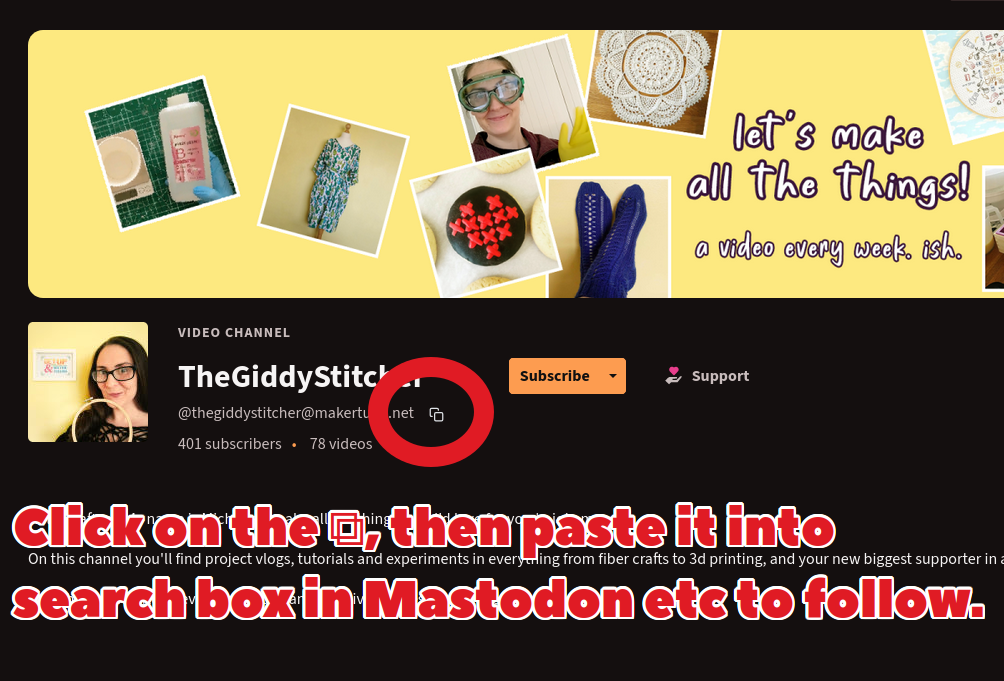
You can find some nice human-curated Halloween-themed Fediverse videos on this playlist: 🎃 If you see an account or channel on the playlist that you want to follow from Mastodon, click on its name to see its profile page and then copy its address into your Mastodon search box (step-by-step instructions on how to do this at ). You can also find lots more human-curated video playlists at #FediTips #PeerTube #Halloween