##
How I Got My Passion For TechI’ve often been asked over the years, how did you get interested in tech? Since I was just asked yesterday by someone, I decided what better way to answer that question than with a blog post.
I first got interested in tech at a very early age, likely around 4 or 5 years old. I was living in [Houston, TX]( ), as my parents moved there when I was between 2 and 3 years old. They moved there from [Cocoa Beach, FL](
 ) because of the oil boom that was just starting. Plus, it was a much bigger city than Cocoa Beach which they wanted mainly for job market stuff.
We were living on a 75 acre ranch at the time and I remember I had a 13-inch black and white Sony TV that I watched cartoons on. One day, out of the blue, my dad decided to hook up this machine to my TV called[ Pong]( ). I had no idea what Pong was, but little did I know it would be the beginning of a new journey for me in life and one that would stick with me forever.
Once Pops got it hooked up, and tuned the TV to channel 3, as that’s how we played video games for many years back in the day, I heard this little set of intro beeps and noises, and I was instantly intrigued.
I remember I sat in front of my TV for hours upon hours that day, without eating, getting up and stretching or anything else. I was addicted and it was to some fascinating piece of technology that I was suddenly addicted to.
Every day afterwards, I remember just sitting in front of that small TV playing Pong endlessly for hours on end as if it were all life had to offer. Little did I know at the time that this would be just the beginning of a life long fascination to video games and all things tech.
Two or three years later, the [Atari 2600](
) because of the oil boom that was just starting. Plus, it was a much bigger city than Cocoa Beach which they wanted mainly for job market stuff.
We were living on a 75 acre ranch at the time and I remember I had a 13-inch black and white Sony TV that I watched cartoons on. One day, out of the blue, my dad decided to hook up this machine to my TV called[ Pong]( ). I had no idea what Pong was, but little did I know it would be the beginning of a new journey for me in life and one that would stick with me forever.
Once Pops got it hooked up, and tuned the TV to channel 3, as that’s how we played video games for many years back in the day, I heard this little set of intro beeps and noises, and I was instantly intrigued.
I remember I sat in front of my TV for hours upon hours that day, without eating, getting up and stretching or anything else. I was addicted and it was to some fascinating piece of technology that I was suddenly addicted to.
Every day afterwards, I remember just sitting in front of that small TV playing Pong endlessly for hours on end as if it were all life had to offer. Little did I know at the time that this would be just the beginning of a life long fascination to video games and all things tech.
Two or three years later, the [Atari 2600]( ) was really becoming popular and it was something I wanted my parents to get me as soon as I could. Unfortunately, the Atari 2600 would be out for a couple of years before we’d get one. Funny thing is, I remember that day like it was yesterday when it finally happened.
My mom and my grandmother, Nana, went to [Willowbrook mall in Houston]( ) to go shopping. I had been talking up a storm about wanting an Atari, and little did I know that it would happen on this day. To make a kind of long story short, we went to several department stores such as [Montgomery Wards](
) was really becoming popular and it was something I wanted my parents to get me as soon as I could. Unfortunately, the Atari 2600 would be out for a couple of years before we’d get one. Funny thing is, I remember that day like it was yesterday when it finally happened.
My mom and my grandmother, Nana, went to [Willowbrook mall in Houston]( ) to go shopping. I had been talking up a storm about wanting an Atari, and little did I know that it would happen on this day. To make a kind of long story short, we went to several department stores such as [Montgomery Wards]( ), [JC Penney’s](
 ), Sears and others, as well as a few toy stores such as KB Toys, The Children’s Palace, [Radio Shack](
 ) and a one off place called [Game Peddler](https://www.houstonarchitecture.com/topic/22307-the-game-peddler-in-willowbrook-mall/ ). What I didn’t know at the time was that my mom was looking for the best deal price wise on an Atari 2600 and bundles that included a game or two.
We ended up going to back to [KB Toys]( ), which I thought was super weird, as that was something we had never really done. At the same time, I was getting super excited as I kind of knew what might be about to happen. Sure enough, we walked in, my mom asked a sales person for some help getting an Atari 2600 and a couple of games. Those two games were [Adventure](
) and a one off place called [Game Peddler](https://www.houstonarchitecture.com/topic/22307-the-game-peddler-in-willowbrook-mall/ ). What I didn’t know at the time was that my mom was looking for the best deal price wise on an Atari 2600 and bundles that included a game or two.
We ended up going to back to [KB Toys]( ), which I thought was super weird, as that was something we had never really done. At the same time, I was getting super excited as I kind of knew what might be about to happen. Sure enough, we walked in, my mom asked a sales person for some help getting an Atari 2600 and a couple of games. Those two games were [Adventure]( ) and [Yars’ Revenge](
 ). The console came with Combat.
I can still feel the chills, the excitement, the joy and the huge smile I had on my face knowing my life long dreams(7 years old at the time) had just come true. Life was now complete! Or was it?
I couldn’t wait to get home, but unfortunately my mom and Nana were hungry, so we went to the food court in the mall to get something to eat. Then we went over to [Toys ‘R Us](
). The console came with Combat.
I can still feel the chills, the excitement, the joy and the huge smile I had on my face knowing my life long dreams(7 years old at the time) had just come true. Life was now complete! Or was it?
I couldn’t wait to get home, but unfortunately my mom and Nana were hungry, so we went to the food court in the mall to get something to eat. Then we went over to [Toys ‘R Us]( ) which was right across the street to look for more games, though I don’t think we bought anything.
Finally, we’re home and ready to get this thing hooked up. It seemed like mom was taking forever to figure it out and get it all hooked up, but surely that was just the adrenaline and excitement
Again, once the console powered on, and I heard whatever noise it was that the Atari 2600 produced, I was intrigued beyond all belief. I think my mom actually put Adventure in the slot first, and that too was an instant game changer. Adventure would go on to be one of the toughest games at the time, but one of my most played games as well as one of my top 5 games of that era.
While I did get my start on Pong, I really credit the Atari 2600 as what got me into video games as a whole when I was a kid. I think a lot of that had to do with the fact that it was in color unlike Pong which was black and white only. Plus the Atari obviously had a lot more sounds and more in-depth games than what Pong offered.
From then on, my interest and my addiction to all things tech, any thing that beeped, made noise or anything similar was something that I wanted to know more about and wanted to tinker with. We pretty much owned every game console after that point, except for a few such as [Odyssey](
) which was right across the street to look for more games, though I don’t think we bought anything.
Finally, we’re home and ready to get this thing hooked up. It seemed like mom was taking forever to figure it out and get it all hooked up, but surely that was just the adrenaline and excitement
Again, once the console powered on, and I heard whatever noise it was that the Atari 2600 produced, I was intrigued beyond all belief. I think my mom actually put Adventure in the slot first, and that too was an instant game changer. Adventure would go on to be one of the toughest games at the time, but one of my most played games as well as one of my top 5 games of that era.
While I did get my start on Pong, I really credit the Atari 2600 as what got me into video games as a whole when I was a kid. I think a lot of that had to do with the fact that it was in color unlike Pong which was black and white only. Plus the Atari obviously had a lot more sounds and more in-depth games than what Pong offered.
From then on, my interest and my addiction to all things tech, any thing that beeped, made noise or anything similar was something that I wanted to know more about and wanted to tinker with. We pretty much owned every game console after that point, except for a few such as [Odyssey]( ) and [Odyssey 2](
 ). We owned consoles such as [Intel](
 )[l]( )[ivision]( ), [ColecoVision](
 ), [Atari 5200](
 ) and [Atari 7800](
 ) as well as later consoles such as the [Nintendo NES](
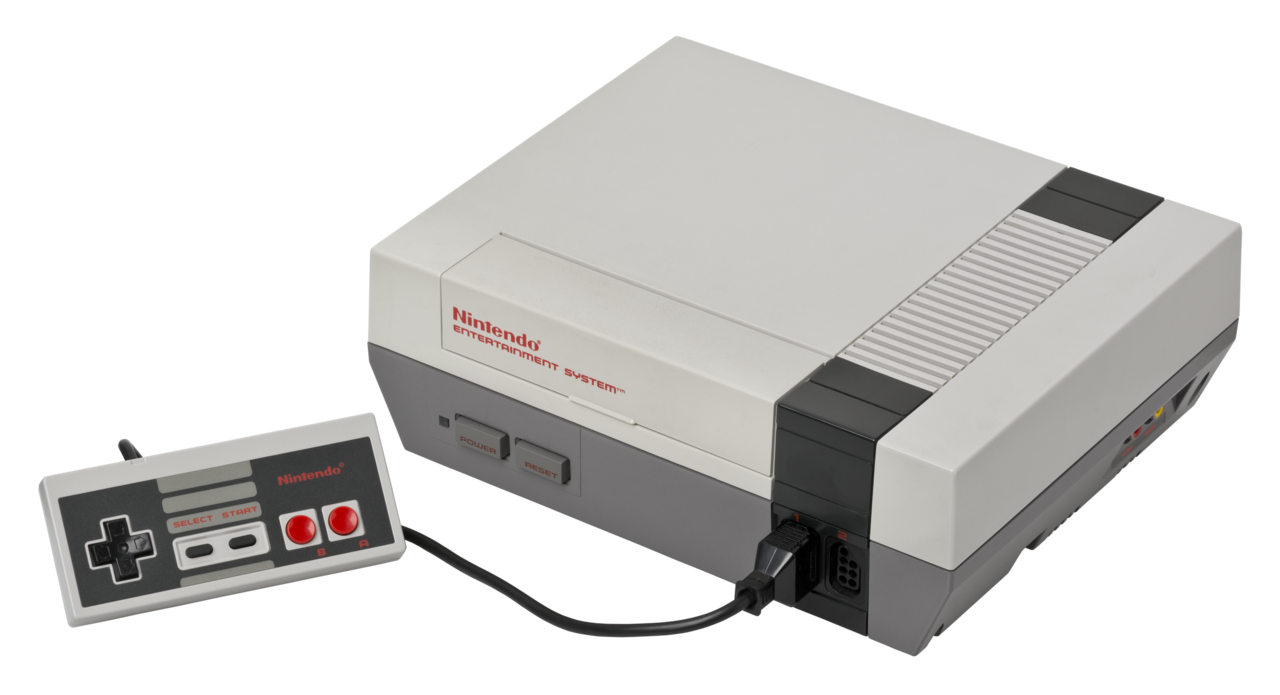 ) and again, most everything afterwards.
This interest carried over well into my teens and my adult life. Today, I have a huge interest and obsession with mobile phones, such as [Android]( ) phones and [iPhones](
) and again, most everything afterwards.
This interest carried over well into my teens and my adult life. Today, I have a huge interest and obsession with mobile phones, such as [Android]( ) phones and [iPhones]( ). I still play video games as well at the age of almost 53. I mainly play on PC, but I do own an [Xbox Series S](
 ), [Nintendo Switch](
 ), [Steam Deck](
 ) and of course a [Playstation 5](
 ).
While this is certainly a shortened version of what could be a very long post with regards to my love for tech over the years, it at least gives you the basics of what got me interested originally and is the reason why I’m so passionate about tech of all kinds to this very day.
If you are like me and have a passion for tech and all things that go beep/boop, feel free to start up a conversation with me on Mastodon which is my social media platform of choice. You can find me here: [Cliff Wade](https://allthingstech.social/@cliffwade ) as I’m the co-admin of my own Mastodon instance, properly named: [AllThingsTech.social](https://allthingstech.social ).
#AllThingsTech #Atari #ColecoVision #Nintendo #Playstation #Pong #Technology #Xbox
).
While this is certainly a shortened version of what could be a very long post with regards to my love for tech over the years, it at least gives you the basics of what got me interested originally and is the reason why I’m so passionate about tech of all kinds to this very day.
If you are like me and have a passion for tech and all things that go beep/boop, feel free to start up a conversation with me on Mastodon which is my social media platform of choice. You can find me here: [Cliff Wade](https://allthingstech.social/@cliffwade ) as I’m the co-admin of my own Mastodon instance, properly named: [AllThingsTech.social](https://allthingstech.social ).
#AllThingsTech #Atari #ColecoVision #Nintendo #Playstation #Pong #Technology #Xbox

Houston - Wikipedia
Cocoa Beach, Florida - Wikipedia
Pong Game
Atari 2600 - Wikipedia
Willowbrook Mall
Willowbrook Mall
Shop the brands you love at the best shopping mall in Houston. Visit Willowbrook Mall for shopping, dining, and entertainment activities.
Montgomery Ward - Wikipedia
JCPenney - Wikipedia
Radio shack - Wikipedia
KB Toys - Wikipedia
Adventure (1980 video game) - Wikipedia
Yars' Revenge - Wikipedia
Toys"R"Us
Toysrus.com, The Official Toys”R”Us Site - Toys, Games, & More
Toys”R”Us is the leading kids store for all toys, dolls, action figures, learning games, building blocks and more. C'mon, Let's Play!
Magnavox Odyssey - Wikipedia
Magnavox Odyssey 2 - Wikipedia
Intellivision - Wikipedia
Intellivision - Wikipedia
Intellivision - Wikipedia
ColecoVision - Wikipedia
Atari 5200 - Wikipedia
Atari 7800 - Wikipedia
Nintendo Entertainment System - Wikipedia
Android (operating system) - Wikipedia
iPhone - Wikipedia
Xbox Series X and Series S - Wikipedia
Nintendo Switch - Wikipedia
Steam Deck - Wikipedia
PlayStation 5 - Wikipedia