## Blog Questions Challenge Part Three: Music EditionI was tagged by [Jason Crabapple]( ) to do the [Music Question Challenge](https://cool-as-heck.blog/music-questions-challenge/ ). Super excited about this one as I absolutely love music!## What Are Five Of Your Favorite Albums?Good thing I’m limited to only five, as I have a LOT of albums that I truly enjoy. The order in which these will be listed are by my favorite all time. But let’s get started!<li><strong>Bon Jovi </strong>– <strong> <a href="https://en.wikipedia.org/wiki/Slippery_When_Wet">Slippery When Wet</a></strong>: This is a no brainer for me and is at the very top of the list not only because it has my favorite song of all time, which I’ll mention below, but it’s an overall great album that I actually like every song on the album. It was also the album tour that I saw Bon Jovi live in concert for the first time at the Summit in Houston, TX. The videos from this album were absolutely awesome and I still watch several of them on a regular basis today.</li><li><strong>Poison</strong> – <a href="https://en.wikipedia.org/wiki/Look_What_the_Cat_Dragged_In">Look What The Cat Dragged In</a>: The debut album by Poison that truly caught my attention from the second I heard the very first note on August 16th, 1986. Again, I love every song on this album as well as every video for each song that was ever released. Most people will choose Talk Dirty To me, I Want Action or I Won’t Forget You as their favorite track from the album, but mine is easily <strong>Cry Tough</strong>. A song that to me has a pretty powerful meaning to it. Poison became such an influential group in my life as I have seen them live in concert a total of 53 times to date. </li><li><strong>Motley Crue</strong> – <a href="https://en.wikipedia.org/wiki/Theatre_of_Pain">Theatre Of Pain</a>: Another great album that I enjoy literally every song from. While this wasn’t Motley Crue’s first album, it was their best album to date though <strong>Shout At The Devil</strong> was a very close second in my opinion. Like most everyone, <strong>Home Sweet Home</strong> is easily my favorite song from this album, and the cool thing about that song is, a big majority of the video for the song was shot at The Summit in Houston, TX, which I actually attended.</li><li><strong>Daughtry</strong> – <a href="https://en.wikipedia.org/wiki/Daughtry_(album)">Daughtry</a>: I instantly fell in love with Chris Daughtry’s voice the second I heard it on the American Idol auditions back in 2006. The debut and self-titled album Daughtry is without a doubt my favorite album the band has released. Especially the song <strong>Over You</strong> which is my favorite track not only on this album, but my favorite track that Daughtry has ever recorded.</li><li><strong>Linkin Park</strong> – <a href="https://en.wikipedia.org/wiki/Meteora_(album)">Meteora</a>: The second album by Linkin Park was what caught my attention immediately. I hadn’t really listened to them prior to this album, but in all fairness, I hadn’t listened to a lot of alternative music at the time. There was something about this album that changed the type of music I listened to at the time and for many years to come. So many great songs on this album but to me, there’s nothing better than the song <strong>Faint</strong>. The beat, the lyrics and that ever impressive screaming by the late Chester Bennington really resonated with me and I instantly became a Linkin Park fan for life!</li>## What Are Five Of Your Favorite Songs?I’m purposely going to leave my favorite song of all time off of this list, only because that question is asked later and I want to save that discussion until then. So five of my favorite songs, in no particular order are as follows.<li><strong>Linkin Park</strong> – <a href="https://en.wikipedia.org/wiki/The_Emptiness_Machine">The Emptiness Machine</a>: The first song with new lead singer Emily Armstrong and what a banger of a song this one is. While Emily isn’t Chester, and she’s not even trying to be, she’s the perfect fit for what I call Linkin Park 2.0. This song is catchy and just has a really great beat to it.</li><li><strong>Jimmie Allen</strong> – <a href="https://en.wikipedia.org/wiki/Down_Home_(Jimmie_Allen_song)">Down Home</a>: This song hits me very, very hard. I heard it on American Idol when Jimmie Allen debuted the song and instantly started balling my eyes out. This song reminds me of my dad who had just recently passed away after his 3rd battle with cancer. The lyrics say so many things that I relate to and hoping that I’m doing everything I can to make my dad as proud as possible. I know he’s up there looking “down home” over myself and my wife. </li><li><strong>Don Williams</strong>: <a href=" The Arkansas River Leaves Oklahoma</a>: Far from a popular song, or even a single released on the radio, something about this song grabbed my attention when I was a kid and it’s stuck with me. I saw Don Williams in concert one year at the Tin Hall in Houston, TX and requested by screaming it from the front row. He replied and said, maybe next year. My luck had it, the next year he came back to the Tin Hall and I was on the front row. I once again requested the song and he instantly replied with “You requested this last year, so I’ll do it, but you have to help because I never perform this song in concert and not even sure if the band fully knows it.”</li><li><strong>Poison</strong> – <a href="https://en.wikipedia.org/wiki/Something_to_Believe_In_(Poison_song)">Something To Believe In</a>: My dad’s favorite song by Poison. The first time I ever heard it, I went running into my dads room and told him that he needed to come listen to this song. I didn’t tell him who it was, as he didn’t really care for the music I listened to so I wanted him to just sit and listen. He did just that in during the song he broke down and cried. From that moment forward, it was his favorite Poison song and a song that I later made my ringtone on every mobile phone I owned for when he called. </li><li><strong>Staind</strong> – <a href="https://en.wikipedia.org/wiki/It%27s_Been_Awhile">It’s Been A While</a>: I heard this song while getting my Chilly Willy tattoo in Houston, TX and quickly asked my tattoo artist who it was. He told me it was Staind, which I had never heard of, because at the time, I didn’t listen to any alternative music. That song changed that and it’s solely the song that’s responsible for changing the music I listened to going forward. Just an amazing song. </li>## Favorite Instrument(s)?<li>Drums</li><li>Guitar</li><li>Keyboard</li><li>Synthesizer</li>## What Song Or Album Are You Currently Listening To?**Bananarama** – **It’s Going To Be Alright**. It just happens to be what’s playing on my playlist as I’m writing this blog post. ## Do You Listen To The Radio, And If So, How Often?I only listen to the radio if/when I’m in an Uber/Lyft and the driver has the radio on at the time. I listen to my playlist via streaming it through Apple Music currently, though I have the same playlist on Spotify and YouTube Music. ## How Often Do You Listen To Music?All day, from the moment I wake up for the day until I go to bed at night. I always have my playlist playing and music playing. I listen to music when the wife and I run errands as well most of the time. It’s very rare that I’m not listening to music, and that’s most often when I’m in the shower or sleeping.## How Often Do You Discover Music And How Do You Discover It?On a very regular basis, and especially on Friday’s when most new music is released. I also discover it via Mastodon, Discord and just reading news and other similar things. ## What’s A Song Or Album You Enjoy That You Wish Had More Recognition?This is a really tough question. But I’d have to say it’s neither a song nor an album, but an artist, **Mike Sanchez**. I saw him live as the opening act for Daughtry and Safety Suit several years ago and he is so talented when it comes to music, but nobody really seems to know him. I also had the pleasure of meeting him in person that night and he’s just a down to Earth individual. ## What’s Your Favorite Song Of All Time?FINALLY! I’ve been holding this song back from a couple of lists up top as I wanted to solely talk about it here, but this is the easiest question in the world for me to answer and has been since 1986. [Livin’ On A Prayer]( ) by Bon Jovi. I bought the Slippery When Wet album the day it was released and the second I heard this song, I was instantly in love with it. I said to myself, this song will be a HUGE hit one day. Little did I know, almost 40 years later, it is still to this day Bon Jovi’s most popular and most successful song ever. It’s recognized by most everyone and the lyrics are so true. The song means so much to me, that I even have the name of it permanently tattooed on my left upper arm. This is a song that I literally listen to every single day of my life, LITERALLY! It’s been the default ringtone on every mobile device I’ve ever owned since ringtones became a thing. It’s my ringtone for my alarms if/when I set one and so much more.## Has Your Taste Of Music Evolved Over The Years?Oh yeah, without a doubt! When I was a kid growing up, it was all about country and western because that’s what my parents listened to pretty much 24/7. Then as I got a bit older, around junior high, I started listening to things like hair bands such as Motley Crue, Poison, Ratt and all that stuff. I also listened to what we called “New Wave” back in the 80’s, which is bands such as Depeche Mode, New Order and Erasure. From there as I got a bit older again, I stumbled across alternative like I mentioned above when I first heard It’s Been A While by Staind. That led to me bands like Creed, Seether, God Smack and so much more. Today, it’s a bit of everything from new country, pop, alternative and others. My main focus is often listening to older music such as my 80’s and similar, but I tend to listen to all sorts of my stuff. My playlist has a little over 4,500 songs and has numerous different genres throughout it. It’s always on shuffle, so I hear different things, constantly. ## This Wouldn’t Be A Blog Challenge Without Tagging Someone Else, Right?Yep, 100% correct in asking that, and that’s where I’m going to tag a few different folks such as [Kyle]( ), [Sam]( ), [Liz]( ) and [Dhry]( ). Let’s hear your answers! #Blog #Blogging #Music #MusicGenre image

## Blog Question Challenge Part Two: Technology EditionI’ve often been asked over the years, how did you get interested in tech? Since I was just asked yesterday by someone, I decided what better way to answer that question than with a blog post. Even more, I figured I’d make this a blog post challenge similar to the one we did a few weeks ago back in mid January. You can see that post here: [Blog Question Challenge 2025]( ). Since this is a challenge post, I’ll be tagging a few folks at the end of the post that I’d like to see follow suit and write up a blog post answering the same questions I have answered below.## When Did You First Get Interested In Technology?I first got interested in tech at a very early age, likely around 4 or 5 years old. I was living in [Houston, TX]( ), as my parents moved there when I was between 2 and 3 years old. They moved there from [Cocoa Beach, FL]( ) because of the oil boom that was just starting. Plus, it was a much bigger city than Cocoa Beach which they wanted mainly for job market stuff. We were living on a 75 acre ranch at the time and I remember I had a 13-inch black and white Sony TV that I watched cartoons on. One day, out of the blue, my dad decided to hook up this machine to my TV called[ Pong]( ). I had no idea what Pong was, but little did I know it would be the beginning of a new journey for me in life and one that would stick with me forever. Once Pops got it hooked up, and tuned the TV to channel 3, as that’s how we played video games for many years back in the day, I heard this little set of intro beeps and noises, and I was instantly intrigued. I remember I sat in front of my TV for hours upon hours that day, without eating, getting up and stretching or anything else. I was instantly addicted and little did I know I’d be addicted to this little thing called technology for the rest of my life, all thanks to those little beeps and boops.## What’s Your Favorite Piece Of Technology All-Time?I remember someone asking me this a few years ago, and I have to admit, it’s very difficult for me to answer. Mainly because there are so many pieces of tech that I’ve owned over the years that really changed my life, did certain/special things or whatever that held my attention for years. However, if I had to narrow it down to just one piece of tech to call my favorite of all-time, I’d have to go back to my roots of gaming. I’ll be 54 this year and still play video games on a very regular basis. It’s something I do because I love video games, but also to have “down time” and to just relax and enjoy the day or evening. I’ve been doing it almost daily since I Pops hooked up Pong to that little TV of mine and I don’t see that changing any time soon. With that being said, I’ll expand on this a bit and mention that mobile phone devices of today are a very close second. Those little handheld devices allow us to do so many things in the palm of our hands such as calling anyone in the world, searching the internet, interacting with others on social media and of course, yep, video games!## What’s Your Favorite Piece Of Technology Right Now?Again, very difficult question to answer, but I’ll say something different than video games even though they are still my favorite today. So I’ll mention [computers]( ), since I already mentioned mobile phones above. Computers allow us to do most anything and everything. For me, my computers aren’t just pieces of tech I use to search the web, interact on social media, play video games and anything else, but it’s also used daily for my job since I work from home. I currently work for [HSTPathways]( ) as a Customer Support Specialist and rely on a computer to do that job each and every day, just like many others of us in today’s world. ## Name One New Cool Piece Of Technology We’ll Have In 25 Years!What’s up with these super questions you’re asking? They are certainly tough, but very thought provoking. I’m not really sure here, as I can see so many things being so different in 25 years, but I’m not sure I can actually envision those things. Maybe if I could, I’d invent something and possibly become rich. Drawing a real blank here, and the only thing that really comes to mind is flying cars. Seems silly and seems like a basic answer, and maybe “flying cars” isn’t the correct word. Why do we need flying cars when we have airplanes? Let’s put the silly idea aside, and something I feel we’ll accomplish is to be able to live underwater. As in, we’ll have buildings or domes or similar structures that allow us to easily go underwater from our homes that we have today and live within the ocean. I don’t think it’s some long term solution to anything, but I feel it’s something that a lot of humans would like to see accomplished and maybe we’ll find a way to make it happen. I personally would love to live in a glass dome in the ocean and just watch the ocean life around me. ## Final ThoughtsThis was a random blog post idea that came to mind this morning while I was playing Eternal Strands on Steam and it really made me think about tech and how it all started for me and where I’m at with it today. Now, I’d like to hear from the following people and would love to see them do a blog post answering the same questions as well. Feel free to add more questions if you’d like to explain your love, or hate, for technology a bit further. So yeah, **TAG, YOU’RE IT**! [Kyle]( ), [Jason]( ), [Sam]( ), [Liz]( ), [Adam]( ), [Robb]( ) and [OrbitalMartian]( ) let’s see what you got! #Blog #BlogQuestions #Blogger #Blogging #Challenge #Computers #PC #Technology
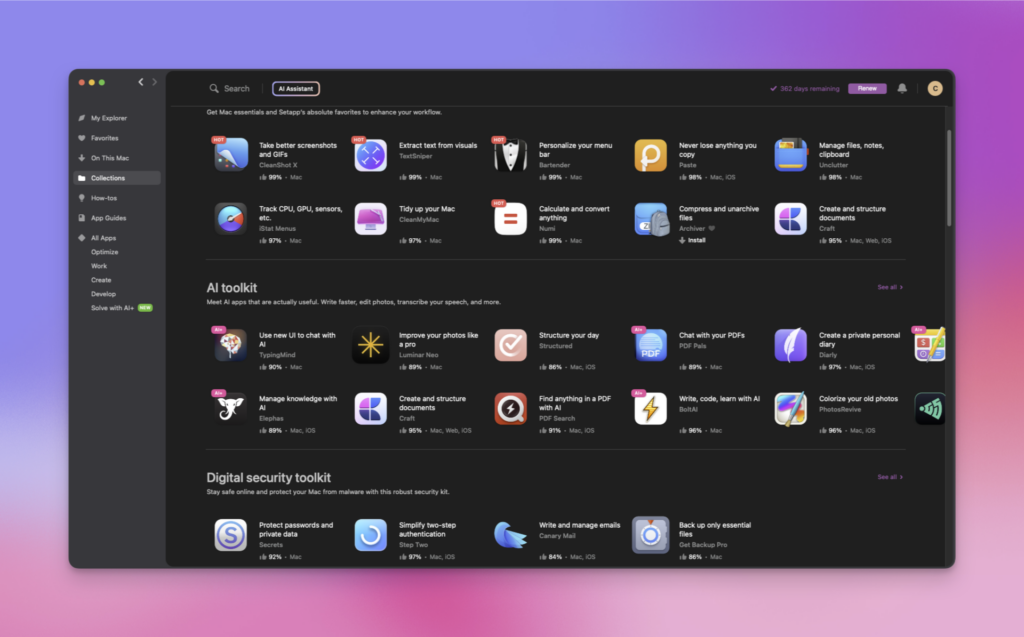
## App Review: SetApp, The Best App Subscription For MacOS And iOSAs the famous saying goes, “there’s an app for that”. However, finding the best app that fits your work style or what you need to be most productive can be quite the challenge. This was and actually still is very true for me since I recently moved from using Windows to MacOS full-time. Good news is, this is where [SetApp](https://setapp.com/?irgwc=1&clickid=QgwyICVdexyKR2fx4DXsTSE3Uksx7rWuP34Pzs0&iradid=343321&irpid=6015589&utm_content=ONLINE_TRACKING_LINK&utm_campaign=Cliff%20Wade&sharedid=&utm_medium=affiliate&mpaid=3&utm_source=impactradius&campaign=impactradius&type=home ) comes into play. ## What Exactly Is SetApp?What is SetApp you ask? While I’ll give you a lot more details below, [SetApp](https://setapp.com/?irgwc=1&clickid=QgwyICVdexyKR2fx4DXsTSE3Uksx7rWuP34Pzs0&iradid=343321&irpid=6015589&utm_content=ONLINE_TRACKING_LINK&utm_campaign=Cliff%20Wade&sharedid=&utm_medium=affiliate&mpaid=3&utm_source=impactradius&campaign=impactradius&type=home ) by MacPaw is a subscription platform that gives you access to well over 240 premium MacOS and iOS apps for one small monthly or yearly price. This allows you to try and use hundreds of apps without having to pay for each individual app. The cool thing about SetApp is, they offer you a slew of apps from all sorts of categories from productivity, task management, creativity all the way to coding, finance, Mac hacks, maintenance and much more. MacPaw achieves this by setting up a licensing deal with these app developers who are paid royalties based on user downloads/usage. Setapp is legal and puts you as a consumer in the driver’s seat, allowing you to receive as much (or as little) value on your monthly subscription. Setapp launched in its first stable release in January of 2017. The subscription model has been a big hit with consumers amassing over tens of thousands of subscribers.## Licensing And PricingCurrently you can subscribe to SetApp via a monthly or yearly subscription. Obviously, like is the case in most instances, subscribing yearly is going to be slightly cheaper and SetApp is no different. - Free 7-day trial period (no credit card required for sign-up)<br>- Monthly subscription fee for Mac (1 device) only is $9.99+ (no-commitment)<br>- Monthly subscription fee for Mac (1 device) and iOS (4 devices) is $12.49+ (no-commitment)<br>- Annual subscription of $107.88+ ($8.99+/month)<br>- 50% discount for students who prove eligibility<br>- VAT is charged by those countries who abide by this tax (does not apply to US customers)<br>- All subscription pricing includes usage on two Macs (educational plans only include support for one Mac)<br>- Additional Macs can be added to one account for $4.99/month (+VAT) each for up to 3 additional Apple computers## You Mentioned A 7-Day Free TrialThat is correct as MacPaw offers a 7-day free trial without even needing a credit card. Setapp’s trial offers unlimited and unrestricted use of the entire library of apps within the 7 day period. There are no hard limitations set like there is with the free trial of their [CleanMyMac](https://cleanmymac.com ) app. This allows you to give the service a try to see if it’s something you enjoy and would actually use before paying anything at all.## Justifying The Cost Of SetAppIt is true that $9.99 per month isn’t a huge price to pay for a monthly service cost. That equals out to be just 33 cents per day for those of you that need it broken down a bit more and to really explain how good of a deal this is. Given that there are over 240 apps offered within the service (with more added each regularly), I can’t possibly give you a complete list of all apps and their pricing if done individually. Instead, I will go through five premium software components for Mac, which are included in Setapp and show you how valuable this service truly is, at least to me. CleanMyMac X – $39.99/yr<br>Gemini 2 – $19.99/yr<br>Disk Drill – $39.99<br>Coderunner 3 – $19.99<br>iThoughtsX – $49.99<br><br>Total costs of the five popular apps via the Mac App Store:&nbsp;<strong>$169.95</strong><br>Total costs of 12-months of Setapp membership:&nbsp;<strong>$119.88</strong> Now those calculations were based on only five Mac apps out of dozens offered through Setapp. Keep in mind, some apps like CleanMyMac X often require charge upgrade fees when moving from one version to a newer one. Setapp subscribers get to use the latest versions of available software without any hidden costs. Plus, depending on your subscription service, for just a couple of bucks more, you’re also allowed to use this on multiple devices, not just one single device.## Is It Easy To Install/Uninstall An App?MacPaw made it very simple to do both of these. It’s as simple as clicking a couple of buttons which I will provide the full steps below. **How to install an app via SetApp**:<li>Open Setapp</li><li>Navigate to the application that you are interested in</li><li>Click on the ‘Install’ button</li><li>Wait for the installation to complete</li><li>Use finder or browse your applications folder to open your application for unrestricted use</li> **How to uninstall an app via SetApp**:<li>Navigate to the Setapp application that you want to uninstall through Setapp</li><li>Click the dropdown menu under the ‘Open’ button</li><li>Click ‘Uninstall”</li><li>Choose ‘Uninstall Completely’ or ‘Remove Application’</li>## Final ThoughtsTo me, SetApp is much more than just a subscription. It’s a service that allows me to test new apps before purchasing them for a higher price. This is extremely important to me since as I stated early on, I just recently switched from Windows to MacOS and am still learning what apps are useful and needed for the way I do things. ## Invite Link To Get One Month FreeIf you feel you’re ready to dive in and give SetApp a try, you can [Sign Up Today]( ) and instantly gain access to over 240 apps for MacOS and iOS. ## Necessary DisclaimerThis post is actually sponsored by SetApp directly. By clicking any of the links included in this article, it’s possible that I might earn a small commission if you make a purchase using any of the links included. If you do decide to use a link and make a purchase, **THANK YOU**! #AllThingsTech #Apple #Apps #Computers #iOS #MacOS #Reviews #SetApp #Subscriptions #Technology
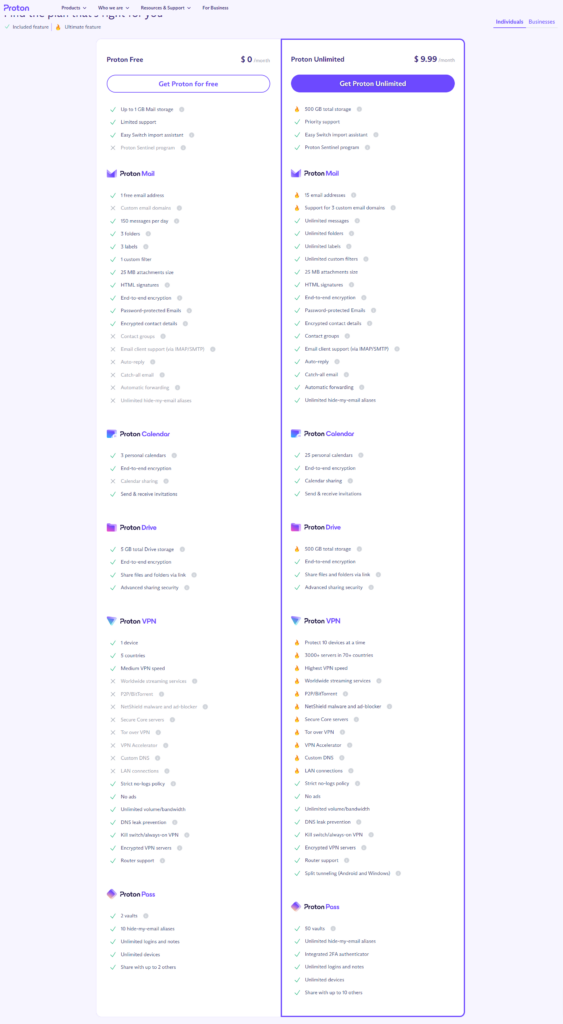
## My /Uses PageIt was suggested to me the other day by **[Christian Tietze]( )** that it might be time for me to do a /Uses page on my blog so that others know what kind of hardware and software I use regularly. Today, I’m doing just that and I hope you all find it interesting.## iOS Apps I Use RegularlyProton Email<br>Proton Pass<br>Proton Drive<br>Proton Calendar<br>That Shopping List<br>Mona For Mastodon<br>Vivaldi<br>Discord<br>Photos<br>Google Photos<br>Uber<br>iCloud<br>YouTube Music<br>Instagram<br>FitBit<br>2FAS<br>CARROT Weather<br>Gboard<br>PixelFed<br>LocalSend<br>ShareShot## MacOS Apps I Use RegularlyLickable Menu Bar<br>Alt-Tab<br>Clean My Mac<br>CleanShot X<br>PopClip<br>Ice Menu Bar<br>SetApp<br>Forklift<br>LocalSend<br>Latest<br>Raycast<br>Shortcuts App<br>Apple Music<br>LastFM Scrobbler<br>Rambox<br>Vivaldi<br>SetApp## Hardware I Use Regularly<strong>Windows PC</strong><br>Intel i9 10700<br>Nvidia 3080<br>64GB of RAM<br>8TB NVMe storage<br>Roccat Vulcan 122 Aimo keyboard<br>Logitech G502X mouse<br>Alienware 34 Curved OLED Gaming Monitor - AW3423DW<br>2 x Viotek GNV27DB 27-Inch Curved QHD Gaming Monitor<br>GoXLR Mini<br>Rode Podmic<br>Rode Podmic swing arm<br>Klipsch ProMedia 2.1 THX Certified Computer Speaker System (Black)<strong>M4 Mac Mini</strong><br>10-Core GPU<br>16GB RAM<br>256GB SSD<br>Roccat Vulcan 122 Aimo keyboard<br>Logitech G502X mouse<br>Alienware 34 Curved OLED Gaming Monitor - AW3423DW<br>2 x Viotek GNV27DB 27-Inch Curved QHD Gaming Monitor<br>Klipsch ProMedia 2.1 THX Certified Computer Speaker System (Black)<strong>Mobile Devices</strong><br>iPhone 16 Pro Max - Desert Titanium<br>AirPods Pro Gen 2<br>Dbrand Grip case<br>Various MagSafe chargers for the iPhone 16 Pro Max<br>Pixel 8 Pro - Bay Blue<br>Pixel Stand for the Pixel 8 Pro<br>Pixel Buds Pro<br>Fitbit Charge 6<strong>Miscellaneous Hardware (Specs not included)</strong><br>Macbook Pro (Personal)<br>Lenovo ThinkPad (Work)<br> Viotek GNV27DB 27-Inch Curved QHD Gaming Monitor<br> 2 x 27-inch ViewSonic monitors<br>Various switches and KVM's<br>Various smart plugs around the house<br>3 x Google Home<br>2 x TCL 65" Class 4-Series 4K UHD HDR Smart Roku TV - 65S455<br>2 x Bose Soundbar 700There is likely other stuff that I use frequently that I’m forgetting but this is a good start of the technology stuff that I use pretty much every single day of my life. Most of it is for personal/home use, but then there is some of it that’s used for work. I’d be curious to see a list of the tech that you use frequently, so feel free to provide a link to the place where you have that list. #Computers #iOS #MacOS #PC #Technology #Windows image
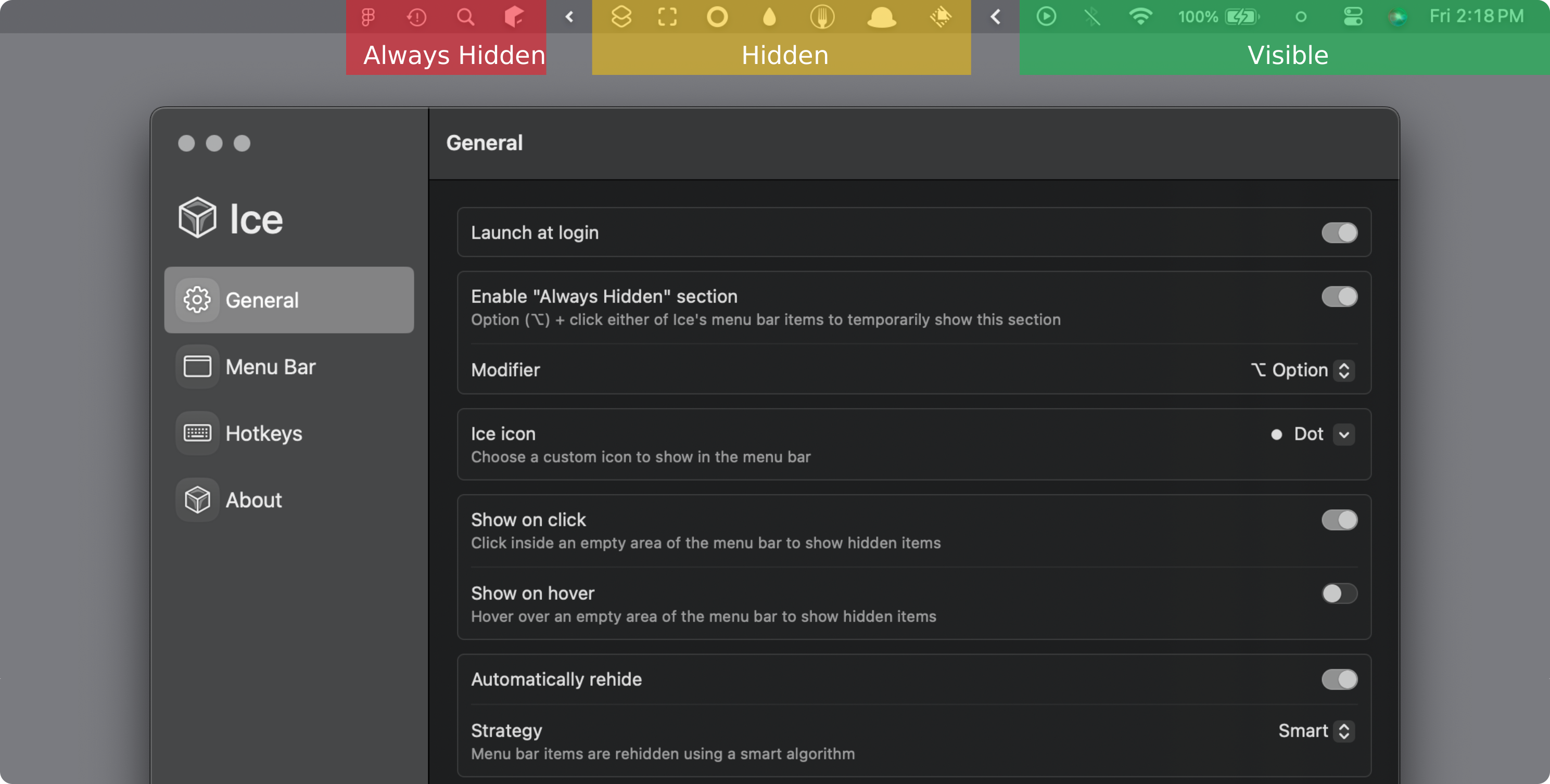
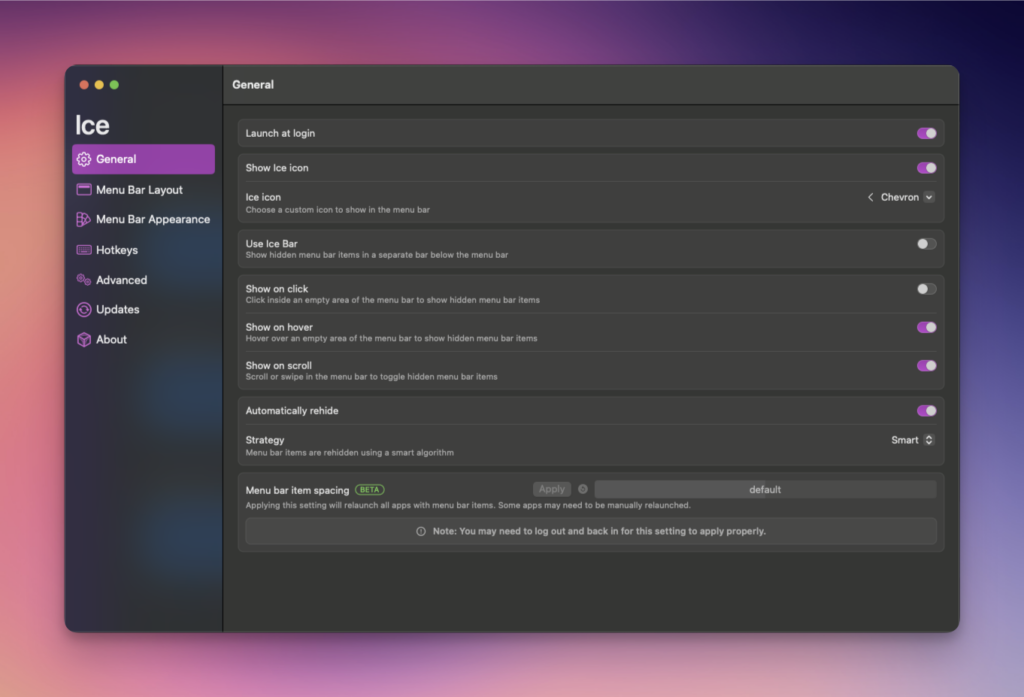
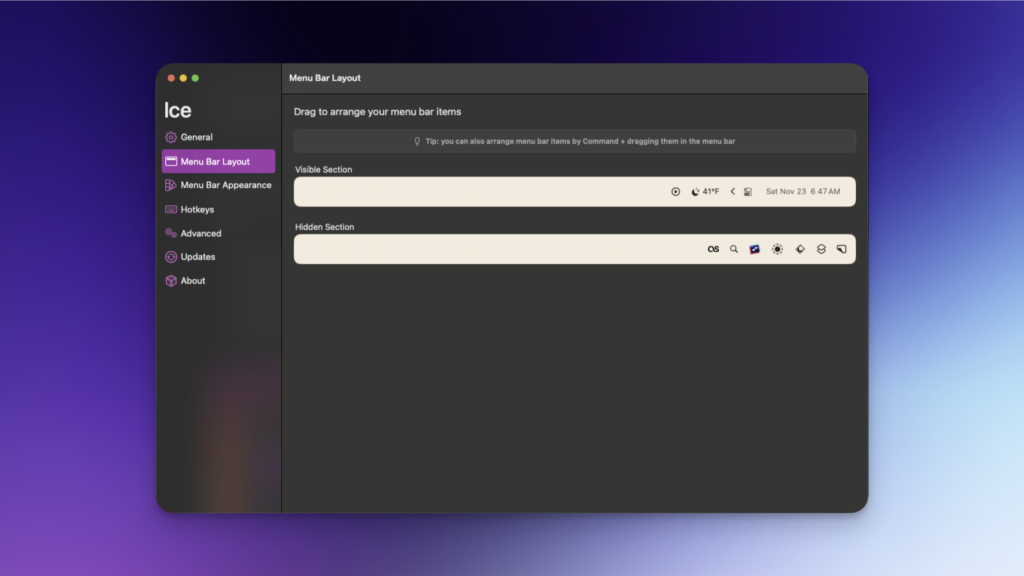
## A Few Of The MacOS Apps That I Really LikeA few weeks ago I went to the [Apple Store at Friendly Center]( ) in Greensboro, NC to pick up my [M4 Mac Mini]( ). This would be my first official use of MacOS on any kind of a regular basis. Needless to say, I would have a lot of learning to do, especially with regards to apps that would be useful and help make my experience the best it can be. Now that it’s been a few weeks, I figured I’d jot down some of the apps that I have discovered and started using in my short journey so far. Hopefully by listing these apps others will find them useful or discover something that might make their experience that much easier or more enjoyable.## [Ice Menu Bar]( )Ice is a powerful menu bar management tool. While its primary function is hiding and showing menu bar items, it aims to cover a wide variety of additional features to make it one of the most versatile menu bar tools available. Some of the features of Ice Menu Bar include. It doesn’t take long at all to start getting a ton of icons on the menu bar at the top of the screen as I quickly realized. My OCD hated this, so I needed something to make my life better, and Ice Menu Bar was just the app. So many features and options to hide icons, show hidden icons and so much more.<li>Show hidden menu bar items below the menu bar</li><li>Drag-and-drop interface to arrange menu bar items</li><li>Customize the menu bar’s appearance</li><li>Menu bar item search</li><li>Custom menu bar item spacing</li><li>… and much more!</li>## [Lickable Menu Bar]( )Lickable Menu Bar – the app that brings back classic menu bar styles to your Mac. If you miss the beautiful menu bars of previous macOS versions, this is the app for you. Lickable Menu Bar offers three predefined styles to choose from. The MacOS menu bar isn’t the best looking, nor is it very configurable by default. Lickable Menu Bar makes it look considerably better and works very well with Ice Menu Bar mentioned above.<li>Matte, reminiscent of the menu bar in Mac OS X Mavericks</li><li>Flat, similar to the menu bar in macOS Catalina</li><li>Glossy, like the menu bar in Mac OS X Tiger</li>## [Alt-Tab]( )AltTab is an app that gives you a much nicer and more configurable window switcher with MacOS. The default that the system uses is pretty boring, but AltTab makes it much more tolerable and has extra features. I am so used to use AltTab to switch windows as I’ve been doing it for years. The MacOS built-in system is decently ok, but it’s not that nice looking so AltTab provides me with a better looking solution that also has quite a few features to make it that much better.<li>Switch focus to any window</li><li>Minimize, close, fullscreen any window; Hide, quit any app</li><li>Customize AltTab appearance (pick one of 3 styles, then customize further)</li><li>Custom trigger shortcuts with almost any keys</li><li>Blacklist apps you don’t want to list or trigger AltTab from</li><li>Light and Dark Appearance</li><li>Drag-and-drop things on top of window thumbnails</li><li>Accessibility: VoiceOver, sticky keys, reduced transparency, etc</li>## [CleanShot X]( )CleanShot is the ultimate screen recording app made for macOS. With its rich toolkit, CleanShot actually feels like 6 apps in one. You can use it to swiftly capture Mac’s screen without desktop icons, record and trim video, annotate, save screenshots to dedicated cloud, and more. I take a LOT of screenshots for various things, so having a tool that is quick and easy to use is important. Cleanshot X is just that, but so much more. All of the screenshots included in this article were taken and edited with Cleanshot X.<li>Hide desktop icons</li><li>Annotate</li><li>Background tool</li><li>Quick access overlay</li><li>Screenshots and screen recording</li><li>Cleanshot Cloud save</li>## [LocalSend]( )LocalSend is exactly what it likely sounds like it is, an app that allows you to share files locally to your various devices and to do so with ease. It’s available not only for MacOS, but for Windows, iOS, Linux and Android. I use LocalSend for sharing files, mostly photos, directly from my iPhone 16 Pro Max to my Windows and MacOS devices. This helps me post them easier on social media or do other things that I might need or want to do. I wrote a full review of LocalSend a while back here on the SeerOfSouls blog that you can view here: [LocalSend: A Fast, Secure Way To Transfer Files Between Devices]( ).## Final ThoughtsThe list of apps above are just a few of the apps I’ve discovered in the first few weeks of fully switching to MacOS. There are many others and I’ll be writing about those in the future. The ones I’ve chosen to list here are the ones that I am currently using the most and that make my switch from Windows to MacOS much easier and smoother. I’d certainly love for you to list any and all MacOS apps that you enjoy or find useful in your daily routine. I’m sure there are many that y’all use that I too would or could find useful and beneficial for the things I do. #AltTab #Apple #Apps #CleanShotX #Computers #IceMenuBar #LickableMenuBar #LocalSend #MacOS #PC #Technology
## If You Could Have One Superpower, What Would It Be, And Why?At some point, most all of us have wanted to have some kind of superpower for whatever reason. A lot of it comes from watching various movies such as Superman, Spider-Man, Batman or many other things. This is a question that any time I see someone on social media that I follow post a “Ask Me Anything” type question, I’ll often respond and ask them this very question. So today, I’m asking all of you, **if you could have one superpower, what would it be and why**? And yes, it can be anything as there are no limitations here in any way. For me personally, this is always super easy to answer and something I never have to think for more than a second as to what my answer is: **TELEPORTATION**! I would absolutely love the ability to go anywhere, at any moment, without having to pay for traveling, having to go somewhere such as an airport just to fly across the country to Las Vegas or another country or whatever. I want to use it to visit every place imaginable, and possibly places that aren’t so imaginable. To be able to snap my fingers so to speak and be in Norway one minute, and then Paris viewing the Eiffel Tower at night the next minute, to standing on the Great Wall of China the next minute would just be so awesome and amazing. And yes, that’s exactly how I want it to work. To be able to snap my fingers, or just say something to myself such as “put me at the base of the Eiffel Tower at night” and it just happen. I don’t want to go to some machine like you see above, stand in it, push some buttons or whatever. That’s too limiting, as I’d always have to go back to that machine to get to my next destination. I just want to go and I want to go NOW! If you’ve made it this far through this silly blog post of mine, I definitely would love to hear from you in the comments below as to what your superpower of choice would be and why would you choose that specific one? Be as detailed as you’d like and make me want to think that having that superpower might be better than **TELEPORTATION**. Though to me, I don’t see anything cooler, but maybe y’all can convince me otherwise. #Superpower #Technology #Teleportation
## Random Thoughts At Six In The Morning…There used to be a time back around 2011 – 2015 or so that I was able to write blog posts regularly. I would often do so several times per week. Some of that was because I had a lot of products to review, but some of that was just random stuff I would come up with to write about. Plus I was much more heavily into mobile devices(read that as Android), and was customizing my device and doing different things. I don’t spend much time on my mobile device(read this one as my iPhone) as customization just isn’t of interest any longer. Now, let’s fast-forward some 10 – 14 years later, and it’s something I struggle with, regularly. I can never come up with blog post ideas, and in a lot of ways, that discourages me because I want to write more blog posts. I really don’t know why it’s like this now days, but it’s been like this for years. I don’t know if it’s because I once experienced burn out from when I was doing it regularly, or if it’s because I just don’t do much outside of my work day to have things to write about. There are times that I even try and do a Google search for something like “blog post ideas” or something similar, and nothing just catches my attention enough that I pick something and go with it. I even read other blogs and click links that interest me to see if those can inspire me, but it never seems to do that. So my question to y’all, for anyone who randomly writes blog posts of their own, how do you come up with ideas to write a blog post? Anything specific? Do you go looking for subjects to write about or do things just pop in your head and you then take it and run with it? Do you do the Google search idea that I mentioned above and then pick something that others have done and go with that? What’s your secret or what’s your suggestions on how to produce more content? It’s funny because I was wanting to write a blog post this morning, but couldn’t come up with anything to write about, yet look where we are? Yep, an actual blog post. Granted, it’s complete randomness, but it’s a blog post nonetheless and it’s something I can and certainly will publish this morning as I really would like ideas from others on how you come up with things to write about. While I know this was certainly a very weird and random blog post, I do want to say thank you to anyone who takes the time to read it and of course a thank you to anyone who might comment and provide some suggestions to me on how to come up with subjects to write about. Y’all are the folks that I want to write things for and I hope to find more ways to entertain you through my writing. #Blogging #Computers #PC #RandomThoughts #Technology #Writing
## The 365 In 2025 Photo ChallengeNow that 2024 is over and 2025 has begun, it’s always nice and often fun to try new things. Personally, I never participate in these social media challenges that you see people do online as it’s just not something I’ve ever been interested in or know I likely won’t get too far. I know [Kyle Reddoch](https://allthingstech.social/@beardedtechguy ) posted about this challenge to [his blog](https://weblog.kylereddoch.me/2025/01/a-365-in-2025-photo-log-challenge ) yesterday as well, but I wanted to do the same to hopefully give a bit more exposure to this challenge and the hashtag we’ll be using for this. However, thanks to [Andrew Melder]( ), a member from AllThingsTech’s Discord, he has come up with a challenge that I’m actually going to give a try. Again, I’m not sure how far I will get, but I’m going to give it my best shot. So what is this challenge you ask? It’s the **#365in25** challenge and it works by posting a photo you have taken each day of the year and use the hashtag mentioned above, **#365in25**. I’ll also specifically be using the hashtag **#365in2025** just to clarify the year at the end. You can post these pictures anywhere you’d like, such as via Mastodon, Pixelfed, a website of yours or anywhere else. The photos also don’t need to be of a specific theme or anything like that. Just any random photos you have taken. In fact, it doesn’t even have to be a photo you took that specific day, as we all know we get busy and life gets in the way and we can often forget to snap a photo or two. However, for me, I’m going to try my best to post a photo that I took from that specific day, as I want to challenge myself to take a photo every day if possible. Since today is January 2nd, 2025, I have already posted my first two photos for this challenge. You can see them via the links below as I posted one directly to my [Mastodon account](https://allthingstech.social/@cliffwade ), and then the second one I posted to my [Pixelfed account]( ). Photo for [January 1st, 2025](https://allthingstech.social/@cliffwade/113754584151381036 ) and photo for [January 2nd, 2025]( ). Also, if you’re currently beta testing the new Surf feed app, Andrew created a custom feed for the hashtag there as well that you can easily follow. Just add this feed URL and you can Surf the feed and enjoy the photos that get posted during this challenge. **Surf Feed**: social://feed/surf%2Fcustom%2F01jfpqenxqkj2y46enmyw0kngp I hope to see many others join in on this challenge, and I’m certainly curious to see how far I make it. As stated above, I’m usually not good at these little challenges, but this is a fun one that I hope to be successful at. #365In2025 #365In25 #Challenge #Photography #Photos #Pictures #SocialMedia #Technology
## Review: Redragon UCAL K673 Pro Anime KeyboardThe [Redragon UCAL K673 Pro Anime keyboard]( ) is a 75% layout mechanical keyboard that has been gaining popularity for its unique aesthetics, wireless functionality, and overall value. This review will delve into its various aspects, including build quality, features, software, battery life, and more.## Design And Build QualityThe standout feature of the K673 Pro Anime is its distinct anime-inspired design. It sports vibrant red keycaps with unique legends and artwork, making it a visually striking keyboard. The 75% layout offers a compact form factor, saving desk space while retaining essential keys like function keys and arrow keys. In terms of build quality, the K673 Pro Anime feels surprisingly solid for its price range. It features a plastic case that exhibits minimal flex, and the keycaps are made of durable PBT plastic, which is known for its resistance to shine and wear. The keyboard also utilizes a gasket mount design, which provides a softer typing experience and reduces noise.## Features and PerformanceThe K673 Pro Anime offers a range of features that enhance its versatility and functionality:<li><strong>Tri-mode connectivity:</strong> It supports Bluetooth 5.0, 2.4GHz wireless, and wired USB-C connections, providing compatibility with various devices.</li><li><strong>Hot-swappable sockets:</strong> This allows users to easily replace the switches without soldering, enabling customization of the typing feel and sound.</li><li><strong>RGB backlighting:</strong> The keyboard features customizable RGB backlighting with various effects, allowing users to personalize their setup.</li><li><strong>Sound-absorbing technology:</strong> The gasket mount design, along with a layer of silencing foam and a silicone pad, contributes to a quieter and more comfortable typing experience.</li><li><strong>One Knob Control</strong>: Armed with a convenient easy access control knob, the keyboard backlight brightness and media (volume, play/pause, switch) are all in control with no hassle. Plus there is no extra keys or space to waste. </li> The typing experience on the K673 Pro Anime is generally positive. The gasket mount provides a cushioned feel, and the pre-lubed linear switches offer smooth key presses. The keyboard is suitable for both gaming and typing, offering a balance of responsiveness and comfort.## SoftwareRedragon provides software for the K673 Pro Anime, which allows users to customize the RGB lighting, create macros, and remap keys. The software is relatively straightforward to use, although it may not be as feature-rich as some other keyboard software. You can find the software for the UCAL K673 Pro via this link: [UCAL K673 Pro software](💾.exe ).## Battery LifeThe K673 Pro Anime is equipped with a built-in 4000mAh battery, which offers decent battery life. With the RGB backlighting off, the keyboard can last for several days on a single charge. However, with the RGB lighting enabled, the battery life will be significantly shorter. When you have RGB enabled on the UCAL K673 Anime keyboard, you can expect about 2 – 3 weeks of battery life. If you have the RGB disabled, you can likely double that if not more, at least from my experience.<strong>Pros</strong>Unique and eye-catching anime designSolid build quality with PBT keycapsVersatile tri-mode connectivityHot-swappable sockets for customizationComfortable typing experience with gasket mountCustomizable RGB backlightingDecent battery lifeAffordable price<strong>Cons</strong>Plastic case may not appeal to all usersSoftware could be more feature-richBattery life with RGB lighting enabled could be better## Discount CodeThanks to the awesome folks over at Redragon for allowing me to review this product and others that they have sent over in the past. They have also provided me with a special URL that anyone can use to save a total of 10% off of your entire purchase across their site. So if you’re interested in purchasing the [Redragon UCAL K673 Pro Anime Keyboard]( ), or any of their products, you can click this link: [Save 10% On Your Entire Order]( ). I believe if you don’t click the link, you can always manually input ***DECRYPTED*** as the code during check out.## Final ThoughtsThe [Redragon UCAL K673 Pro Anime keyboard]( ) is a compelling option for those seeking a unique, feature-rich, and affordable mechanical keyboard. Its distinctive design, solid build quality, versatile connectivity, and comfortable typing experience make it a great choice for both gamers and typists. While it has some minor drawbacks, its strengths far outweigh its weaknesses. Currently priced at $74.99, it can be considered a bit more expensive for some users, but overall it’s a keyboard with great quality that I feel is certainly affordable. #Computers #Keyboards #PC #Redragon #Reviews #Technology
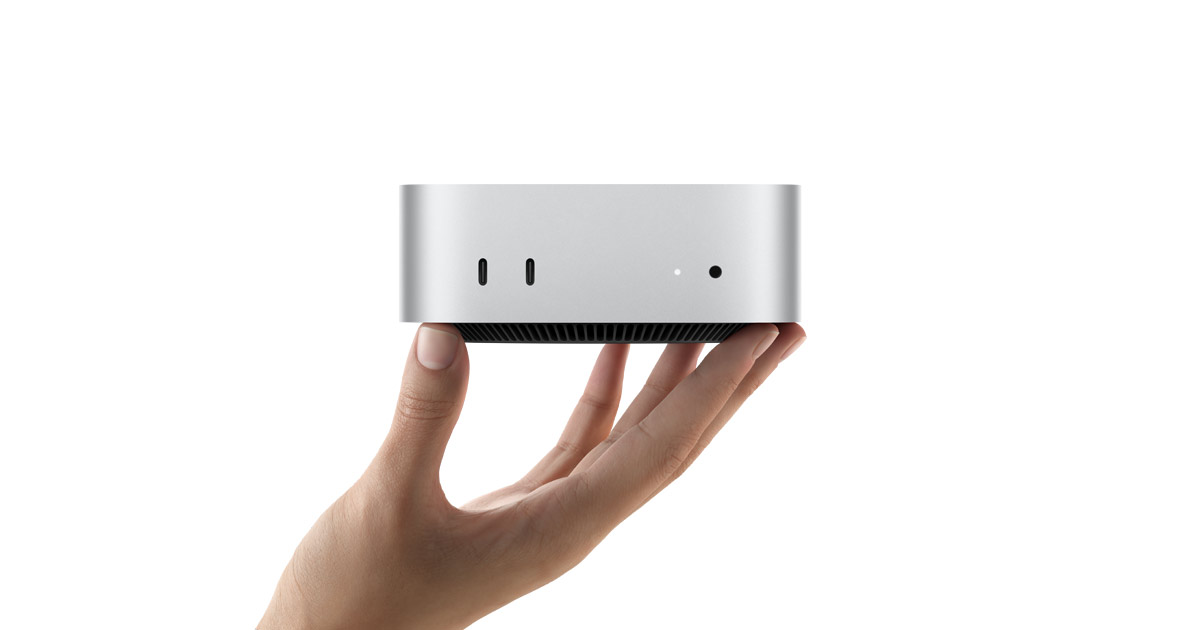
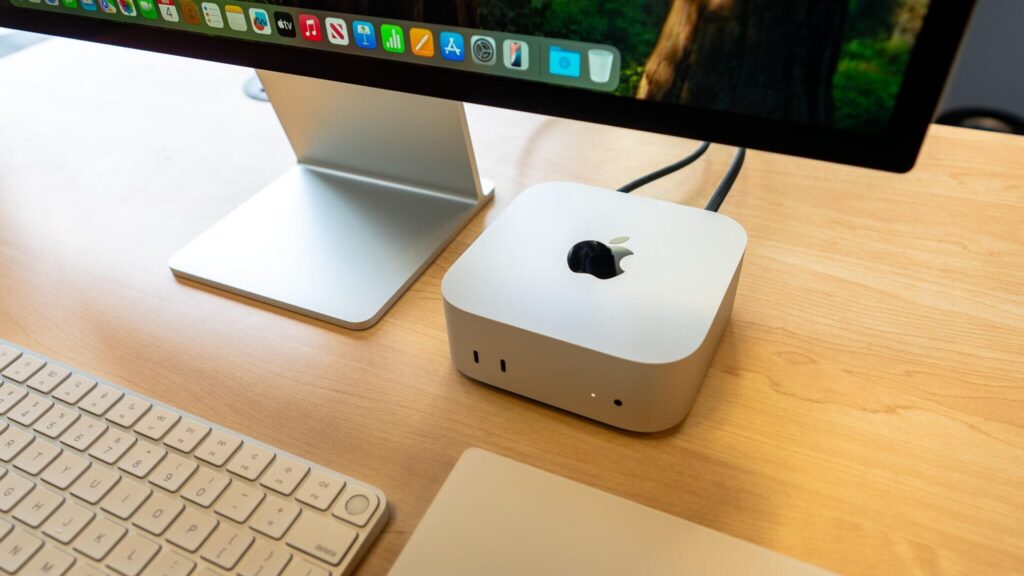
## My First Few Days With The Mac MiniI’ve never been a MacOS user, though I’ve wanted to be at various times. While I do own a very old and very used MacBook Pro that I got from my previous employer, I never really used it for any length of time. Even while I worked at Branch for 2 1/2 years and had a company issues MacBook Pro, I didn’t have to use it because I had special permission to continue using everything from my Windows PC. This past Saturday, November 16th, I decided to change that. Well, I had decided a bit earlier than that, but Saturday is when it physically happened when I went to the Apple Store at Friendly Center in Greensboro, NC to pick up an [M4 Mac Mini]( ). Let me give some background as to why I wanted one of these small little pieces of tech. Since getting laid off from Branch/Nova back in August, I decided to make the full-time switch to iOS when the iPhone 16 Pro Max arrived in September. While I’ve been using iOS for quite a few years, I never could do it full-time since I worked for an Android app. Then the sudden announcement of the M4 Mac Mini happened, and everyone saying how great of a machine it was, I thought what better time to really try using MacOS as well. Plus the fact that MacOS and iOS tie together so nicely, I figured this was a great opportunity to really see what the full ecosystem is all about.## Out Of The Box ImpressionsThe first impression is of course how small the Mac Mini is in size. It’s 2in(H) x 5in(W) x 5in(D) in size and that’s the whole product. It’s literally just a little box that fits in the palm of your hand and weighs in at only 1.5 pounds. To me, it’s completely mind blowing that so much powerful tech can fit in something so small. But it does, and that’s what makes it all that much cooler. The M4 Mac Mini currently only comes in silver, and of course has the pretty silver Apple logo right on top. It blends in great with all of the black I have on my computer desk currently. I couldn’t be happier with it at this point.## My Mac Mini SpecsI elected to go with the lowest base model, the one that starts at $499(via the EDU shop). You can see a screenshot of the specs of my Mac Mini. I didn’t feel I needed or wanted to spend a lot of money on it since this is my first real deep dive into MacOS and I wasn’t sure if it’d be something I’d stick with or not. Update: I will be sticking with MacOS! As you can see from the image above, I’ve installed the MacOS Sequoia Developer Beta on to the Mac Mini and also have all three of my monitors hooked up to it as well. Yes, the same three monitors that are still hooked up to my Windows PC which I’ll still use for gaming since I do quite a bit of gaming. I also have a KVM switch that allows me to use the same mouse and keyboard that I was using on my Windows PC with the Mac Mini as well. Super convenient to say the least.## Thoughts After The First Few Days Of UseMy initial thought here is similar to the thought I had when I took it out of the box. It’s mind blowing that something so small can run so smoothly and without any issues. I’ve had no issues at this point doing my every day stuff such as web browsing, social media, capturing screenshots and other similar things. Beyond that, it’s certainly been a learning experience in a lot of ways. I of course have to learn an entirely new ecosystem of apps and how to do things via MacOS that I have done for decades on Windows without thinking about things. I’ve had to find apps for this, apps for that and so on. But it’s been fun. Thanks to some super awesome folks on Mastodon, such as [Ronnie]( ), [Lou Plummer]( ), [CountableNewt](https://allthingstech.social/@countablenewt ), [BeardedTechGuy](https://allthingstech.social/@beardedtechguy ), [Aaron]( ) and a few others, they have all guided me towards a lot of great apps. Many that I’ve not had the chance to check out and play with to this point. Yet many of them I instantly discovered I needed and/or wanted and am now using them regularly. For the most part, things are very similar to how Windows does them, but certainly not all things. The one thing that I’m struggling with a bit right now is the fact that MacOS doesn’t do Focus Follows Mouse like Windows does. What this means is, when you have multiple monitors or multiple apps on one monitor, simply moving the mouse over another app or monitor doesn’t bring that app or monitor into focus. For example, I have the Vivaldi web browser on my middle monitor and Mastodon on my right monitor. Let’s say I’m currently typing an email within Vivaldi, someone posts something on Mastodon that I want to like and/or boost and since Vivaldi(or the middle monitor in this case) is in focus, for me to actually be able to click the Like button within Mastodon, I have to click to focus that app/monitor, and then click the Like button. It’s slightly annoying since I’ve not had to do that for decades now. I’m sure it’s something I’ll get used to or someone will give me a trick on how to get around it at some point. My only other really gripe, and it’s not a gripe really, it’s just more of a learning curve, is where settings and options are located for various things. In Windows, because I’ve used it for decades now, I knew where everything was for the most part. In MacOS, I’m feeling a bit lost, but slowly figuring things out basically by just exploring and of course Google searching for the things I need or want.## Apps I’ve Discovered So FarI know most everyone is curious about the apps that others use and I’m certainly no different. I’ve asked folks on Mastodon to give me their top 3 – 5 most used apps or apps they recommend the most. I’ve gotten lots of great feedback and because of that, I’m actually going to make this section into another post and make a complete list of apps that I’ve discovered and have started using up this point. I can tell you, I’ve found some really useful things in just a few days.## Final Thoughts On My M4 Mac MiniWith as small as this piece of hardware is, it’s incredible that it does everything that it does and does it with no issues at all. Let me not fail to mention that it makes absolutely no sound at all. If it weren’t in view on my desk, I’d have no idea it was even being used. You’d think the power was off. So far, I’m really like the Mac Mini and MacOS in general. I have it setup very similarly to my Windows PC as far as monitors, apps on those monitors and of course the apps that I’m using for my every day stuff. I definitely foresee myself sticking with MacOS going forward and at some point I could see myself possibly upgrading to something more powerful, be it a more top of the line M4 Mac Mini or maybe going with an iMac or something similar. Not really sure what the future holds long term, but I do know that I’ll be sticking with MacOS for the foreseeable future. Throw in the fact that MacOS and iOS integrate so seamlessly in just about every way possible which only leads me to having that much more to learn, explore and discover along the way. For the price of $499(via the EDU shop), the M4 Mac Mini seems like a no-brainer in so many ways. It’s something that I’m glad I picked up and look forward to what else I end up doing with this little piece of hardware.## One Final Thing…If you’re reading this and have any app recommendations or suggestions, I’d love to hear them. Feel free to comment below and tell me what apps you use or recommend and why. I’d also love to hear any tips and tricks you have for new MacOS users on settings or features to change that makes the experience of MacOS that much better. I’m certainly open to hear what you more experienced users suggest and recommend as I’m sure there are tons of things that I have no idea about quite yet when it comes to this OS and the Mac Mini itself. You can also reach out to me via Mastodon if you’d like to discuss things there. You can find me on Mastodon here: [Cliff on Mastodon](https://allthingstech.social/@CliffWade ) as I’d love to talk MacOS and Mac Mini talk with you! #AllThingsTech #Apple #Hardware #Mac #MacMini #MacOS #Technology